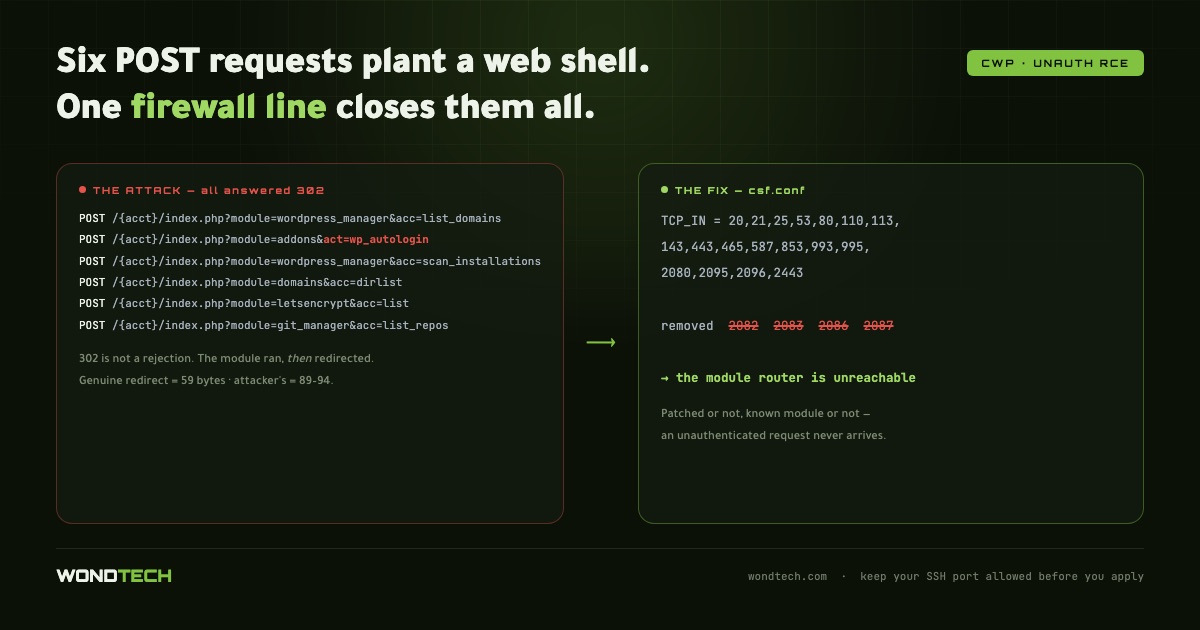
A targeted attack against hosting control panels needs only six unauthenticated POST requests to plant a backdoor. Every one of them returns HTTP 302, which looks like a rejection and is not. Here is the exact signature, how to find it in your own logs, and the one configuration change that removes the entire attack class.
THE ATTACK SIGNATURE If you run a hosting control panel, search your access log for this sequence. It arrives as a burst against one account, then repeats an hour later against the next: POST /{account}/index.php?module=wordpress_manager&acc=list_domains POST /{account}/index.php?module=addons&act=wp_autologin POST /{account}/index.php?module=wordpress_manager&acc=scan_installations POST /{account}/index.php?module=domains&acc=dirlist POST /{account}/index.php?module=letsencrypt&acc=list POST /{account}/index.php?module=git_manager&acc=list_repos Two properties identify this as targeted rather than opportunistic scanning. It guesses the account name first. The opening request in each burst uses a name derived from the domain — "exampleapp" for example.app. That returns 404. The second attempt uses the real account name and connects. The attacker is enumerating, then pivoting. The order is deliberate. The wp_autologin handler is the payload: on a vulnerable panel it executes before the session check. The remaining requests map the target — list the domains, scan for WordPress installations, walk directories, enumerate certificates, read git repositories. Everything is a POST, so no parameters appear in a referer header and nothing lands in browser history. Requests are minutes apart, comfortably below any rate-limit threshold. WHY YOUR LOGS WILL LOOK REASSURING Every one of those requests returned 302 on our server. A redirect to the login page. It looks like the panel rejected an unauthenticated caller. It did not. The module code ran first; the redirect was issued afterwards. The status code describes the end of the request, not what happened during it. The tell is in the response size. On that endpoint a genuine redirect is 59 bytes. The attacker's responses were 89 to 94 bytes. Something was generated before the bounce. grep 'wp_autologin' access_log | awk '{print $9, $10}' | sort | uniq -c A uniform size means the requests were genuinely refused. Mixed sizes mean code ran. WHAT THE ATTACKER LEAVES BEHIND Files named to blend in with the panel's own: cwp_login_74fde05d.php cwp_login_d17bd3ce.php Dropped into the account's document root. The prefix is chosen precisely so that a human scanning a directory listing reads it as a platform file and moves on. Search for the pattern rather than the exact name, because the hash suffix differs per installation: find /home -maxdepth 3 -name 'cwp_login_*.php' -o -maxdepth 3 -name 'cwp_*.php' | grep -v /usr/local THE FIX There is no configuration flag that closes this. The vulnerable code path lives inside the panel, and on many installations no patched release is available — the vendor's own update endpoint may publish a version older than the one you are already running. So remove the attack surface instead. In CSF, take the panel ports out of the inbound list entirely: TCP_IN = "20,21,25,53,80,110,113,143,443,465,587,853,993,995,2080,2095,2096,2443" Note what is absent: 2082, 2083, 2086, 2087. The user panel, the admin panel, and both their TLS variants. An unauthenticated request can no longer reach the module router at all — patched or unpatched, a known module or one disclosed next year. Apply with: csf -r READ THIS BEFORE YOU COPY THAT LINE The SSH port is not in that list either. Neither 22 nor a custom port. Paste it as-is and your next connection is refused, permanently, with no console access on many VPS providers. Choose your route back in before you apply it. Allow a fixed administrative address: csf -a 203.0.113.10 "admin". Entries in csf.allow bypass TCP_IN completely, which is why this covers both SSH and the panel. Use a jump host. We route through a small VPS with a static address, and only that address is allowed. This is the option to choose when your own connection has a dynamic IP. Do not allow a dynamic range you happen to be on today. Our own workstation address moved across eight addresses in a single month. Allowing the whole ISP block defeats the purpose; allowing one address of it locks you out by tomorrow. Verify from an outside network before you close the session that applied the change, and keep that session open until a new connection is confirmed working. TWO FURTHER CHECKS WORTH RUNNING IPv6 is a separate list. TCP6_IN in CSF is configured independently and commonly still contains the panel ports. Confirm whether anything is actually listening on IPv6 with: ss -lnt | grep 208. If the address column shows 0.0.0.0 the service is IPv4-only and the IPv6 list is inert. If it shows [::], your IPv4 hardening is bypassable and TCP6_IN needs the same treatment. Unprivileged crontabs. The same intrusion left a scheduled job under an ordinary account that rewrote a backdoor every twenty minutes from a base64 blob. Deleting the file achieves nothing while the schedule survives: for f in /var/spool/cron/*; do echo "== $f"; grep -vE '^\s*(#|$)' "$f"; done WHAT THIS CLOSES AND WHAT IT DOES NOT Removing the ports ends every unauthenticated attack against the panel — the whole class, permanently, with no dependency on a vendor release. It does not protect the applications your clients host. A vulnerable WordPress plugin on port 443 is untouched by any of this. And it costs your clients direct panel access from the internet. If they need it, the ports must come back, and a WAF rule blocking act=wp_autologin and acc=dirlist becomes the minimum before you reopen.